Marketing
How to Get More Google Reviews for a Takeaway (UK Rules, 2026)
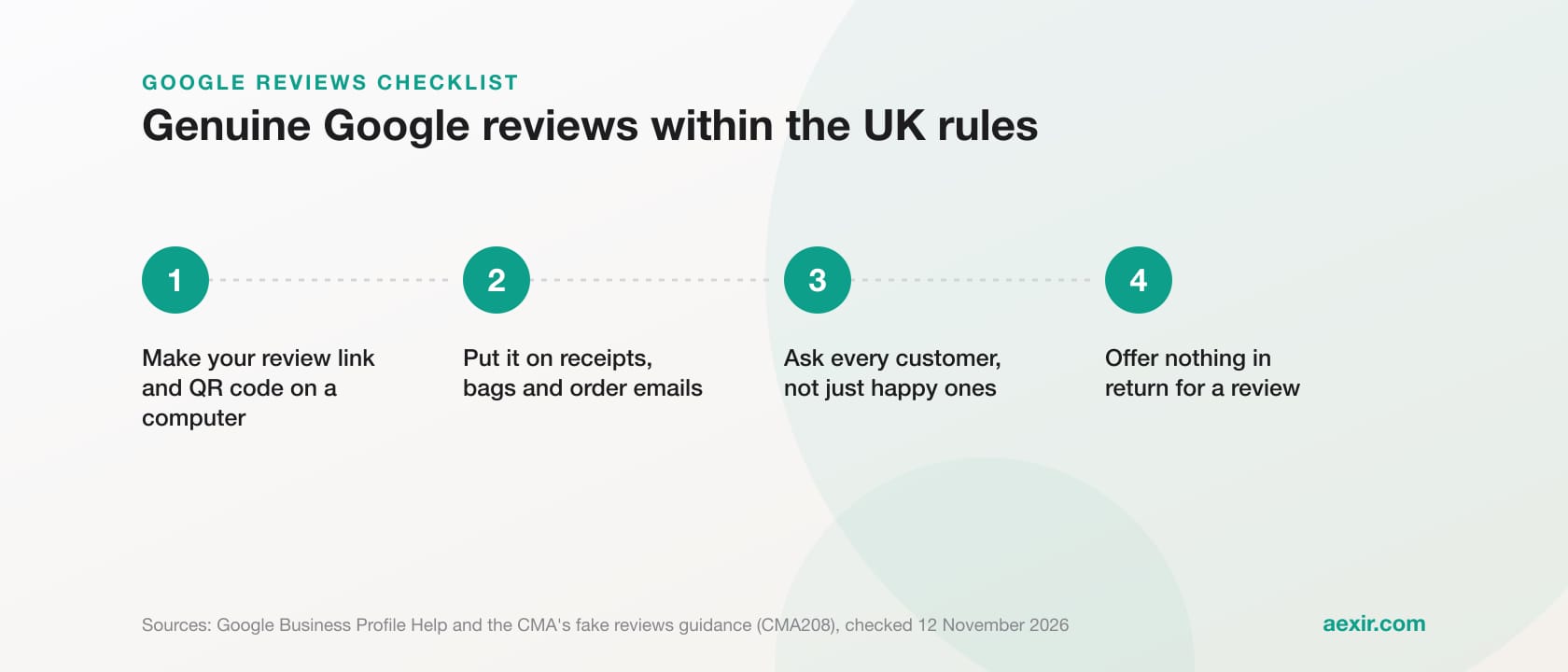
Chart: Aexir, from the figures in this article
To get more Google reviews for a takeaway or restaurant, make a review link and QR code in your Google Business Profile, put it on the receipt, the bag and the order email, ask every customer in the same neutral way, offer nothing in return, and reply to reviews, bad ones first. Since 6 April 2025, fake reviews and reviews that hide an incentive have been banned under the Digital Markets, Competition and Consumers Act 2024, and the CMA can fine up to 10% of global turnover or £300,000, whichever is greater. Every rule below comes from legislation.gov.uk, GOV.UK, the CMA and Google's help pages, checked 12 November 2026.
Short answer: ask everyone, make it one tap, offer nothing and reply politely. Google's policy rules out incentives, asking only happy customers (review gating) and reviews from staff or family. UK law bans fake reviews, hidden incentives and misleading publication of reviews. A summary of the rules, not legal advice.
What UK law bans since April 2025
Schedule 20 of the Digital Markets, Competition and Consumers Act 2024 (the DMCC Act) lists practices that are unfair in all circumstances. Paragraph 13 covers reviews and came into force on 6 April 2025 under SI 2025/272. The CMA's guidance on it, Fake reviews (CMA208), calls the practice automatically unfair and illegal.
It bans submitting, or commissioning someone to write, a fake review (one not based on a genuine experience) or a review that hides an incentive. It also bans publishing reviews or star ratings in a misleading way. Commissioning includes incentivising by any means, not just paying cash.
| Tempting shortcut | UK rules | Google's policy |
|---|---|---|
| Reviewing your own shop, or asking staff, family or friends to | Fake if not a genuine experience. The CMA says commissioning can include asking staff, and hiding that a reviewer is an employee may be misleading | Restricted: conflict of interest includes employment and family. Posting from several accounts is fake engagement |
| Buying reviews, or paying an agency that promises a better rating | Banned, and so is selling that service. The CMA warns you may be liable for a third party's actions | Paid reviews, directly or in kind, are removed |
| A discount or free item for a review | Allowed only if the incentive is made clear and the review is genuine; where a site bans incentivised reviews, submitting one is likely to be misleading | Prohibited for any review |
| Asking only customers you think are happy (review gating) | The CMA lists encouraging just satisfied customers to review as cherry-picking | Selectively soliciting positive reviews is prohibited |
| A refund if the customer changes a bad review | One of the CMA's examples of commissioning a banned review | Incentives to revise or remove a negative review are prohibited |
| Fake bad reviews on a rival | The ban covers fake negative reviews too | Prohibited as fake engagement |
Sources: DMCC Act 2024, Schedule 20, paragraph 13; CMA208 (paragraphs 2.5 to 2.10, 3.4, 3.7, 4.5, 4.6); CMA reviews guidance for businesses; Google's content policy. Checked 12 November 2026.
What happens if the rules are broken
The CMA can now enforce some consumer laws directly, deciding itself whether a business has broken them. It says the penalty can be up to 10% of global turnover or £300,000, whichever is greater, and it can direct a business to compensate consumers. Its guidance adds that fake reviews could lead to criminal action.
Google says a business that breaks its fake engagement policy can have reviews removed, be blocked from new reviews for a set period, have existing reviews unpublished, and have a warning shown to customers that fake reviews were removed.
On 27 March 2026 the CMA opened five investigations into fake and misleading reviews. The questions include whether customers were offered discounts on future orders for 5-star reviews on delivery apps, and whether a company asked staff to write positive reviews. The CMA has not concluded that any of them broke the law; on 14 October 2026 it said the work was continuing.
Step 1: make your review link and QR code
On a computer, go to your Business Profile, select Read reviews, then Get more reviews, then the share icon. Copy the link, or right-click the QR code and choose Save image as. Google says review QR codes can currently only be made in a computer browser, not on a phone.
Reviewers need a Google Account, which Google notes can use a non-Gmail address. While in the profile, check your own ordering link sits ahead of any marketplace: see adding your own Order online button.
Step 2: put the link where every customer sees it
Google suggests receipts, thank-you emails, the end of a chat, a printed QR code on your premises, and requests by email, WhatsApp or Facebook. For a takeaway:
| Where | How | Keep in mind |
|---|---|---|
| Receipt or bag | A QR code on the receipt, or a printed card in every bag, found after eating | Print it large and test it on two phones |
| Order confirmation email | One line: 'How was your food? You can leave us a Google review here.' | Emailing or texting separately from the order? Read our [GDPR and customer data guide](/blog/gdpr-customer-data-takeaway-ordering-app) first |
| WhatsApp or chat | The link at the end of a conversation about an order | One message, not a chase |
| Counter or table | A printed QR code by the till or on the table card | Google says not to require or pressure customers to review while on the premises |
| Your own app and website | A review link on your site, and an occasional reminder to all app users | Everyone, never a hand-picked group |
Placements and the premises rule from Google's help pages; other notes are our advice. Checked 12 November 2026.
Step 3: ask at the right moment, and ask everyone
Google publishes no best time to ask, so this is practical judgement. With delivery and collection, the meal happens after the customer leaves you, so a card in the bag or a message an hour or two later reaches them once they have eaten.
Use the same neutral words every time: 'How was everything? There's a link on your receipt if you'd like to leave a Google review.' Avoid 'If you loved it, give us five stars'. Google allows asking for genuine reviews without trying to influence the rating or content, and that wording targets happy customers only.
Keep asking on bad nights too. The CMA lists arbitrarily stopping and starting review invitations among the ways a business can interfere with negative reviews.
Brief staff the same way. Google says a business should not ask staff to collect a set number of reviews, or reviews with specific content, including naming a staff member. So no review targets, and no 'mention Sam in your review'.
Step 4: reply to reviews, bad ones first
Go to your Business Profile, select Read reviews, then Reply next to the review. Google checks replies against its policies, usually within 10 minutes but sometimes up to 30 days. Approved replies are public, and the reviewer is notified.
- Google's tips: be polite and keep it short.
- Skip the identical thank-you on every review; reply where you can answer a question or share an update.
- No deals or promotions in replies; invite the customer back instead.
- Never share a reviewer's private information or attack them, and take complicated problems private.
- Admit your mistakes, apologise where due, and sign with your name or initials.
Handling a bad review
The CMA says a review is not fake just because the business dislikes it, as long as it reflects a genuine experience. Google says it does not get involved in disputes between businesses and customers, and only reviews that break its policies can be removed.
A fair complaint deserves a replacement or refund, but never make it conditional: a refund or gift card for changing the review is one of the CMA's examples of commissioning a banned review, and Google prohibits incentives to revise or remove one. The CMA also warns against threats of harm or legal action, and against making dispute resolution depend on the customer not leaving a negative review.
Example reply (ours, not Google's): 'Sorry your order arrived cold on Friday, and thanks for telling us. That isn't our standard. Please call the shop with your order number and we'll put it right. [Your name], owner.' Short, owns the problem, moves it private, asks for nothing in return.
Reviews that break the rules, and extortion scams
To report a review that breaks Google's policies, select Read reviews, then the report icon next to it, choose a reason and send. Google says evaluation typically takes several days. Follow it in the Reviews Management Tool; if a review stays up, you get a one-time appeal covering up to 10 reviews.
Google also warns of extortion: a sudden run of 1-star and 2-star reviews, then a demand for money, goods or services to remove them. Do not pay or engage, gather evidence straight away, and use Google's merchant extortion report form.
If you show reviews on your own website
The CMA treats a business displaying reviews on its own site as a publisher, and says even a small trader showing only its own customers' reviews must take reasonable and proportionate steps where its content poses a risk. In practice:
- Do not hand-pick only glowing reviews when they misrepresent reviewers overall.
- Keep any displayed rating current, and update it when fake reviews are removed.
- Publish a short, plain-English review policy that prohibits fake reviews and says how you treat incentivised ones.
- If you display your Google rating and rely on Google's checks, the CMA says you should review Google's policies on banned reviews.
A weekly review routine
- Make the link and QR code once, on a computer, and test them.
- Put them on receipts or bag cards, order emails and chats.
- Use one neutral sentence for every customer, every night.
- No staff targets, no names to mention, nothing offered in return.
- Reply to reviews that need it, bad ones first.
- Report only policy breaches, and never pay to remove a review.
How your own ordering app or website makes asking easier
On a marketplace, the confirmation and follow-up messages come from the marketplace, and ratings sit on its listing, not your Google profile. With your own app or website, more of the moments in Step 2 are yours. Our takeaway marketing ideas cover other ways to win direct orders.
Aexir builds white-label ordering for UK restaurants and takeaways. The parts that help:
- An ordering website and branded iOS and Android app under your name, so customers order from you, not a marketplace.
- Push notifications, for an occasional general reminder to all app customers.
- QR table ordering for dine-in; a review QR code can share the table card, provided nobody is pressured to review at the table.
- Loyalty to reward repeat orders. Keep it separate from reviews: points for a Google review would be an incentive Google prohibits. See our loyalty programme ideas.
Plans are £30, £40 and £50 a month ex VAT; the pricing page shows what each includes. To talk it through, book a free 15-minute call.
Give customers a direct way to order
A branded ordering website, an iOS and Android app, or both, with push notifications and loyalty, for a flat monthly fee at published prices.
See the ordering systemTalk to a real person about switching
Sources
- Digital Markets, Competition and Consumers Act 2024, Schedule 20, paragraph 13: https://www.legislation.gov.uk/ukpga/2024/13/schedule/20 (checked 12 November 2026)
- The Digital Markets, Competition and Consumers Act 2024 (Commencement No. 2) Regulations 2025, SI 2025/272, regulation 2: https://www.legislation.gov.uk/uksi/2025/272/made (checked 12 November 2026)
- CMA, Fake reviews (CMA208), 4 April 2025: https://www.gov.uk/government/publications/fake-reviews-cma208 and the guidance itself: https://assets.publishing.service.gov.uk/media/67eeb64fe9c76fa33048c790/CMA208_-_Fake_reviews_guidance.pdf (checked 12 November 2026)
- CMA, Short guide for businesses: publishing consumer reviews and complying with consumer protection law: https://www.gov.uk/government/publications/fake-reviews/short-guide-for-businesses-publishing-consumer-reviews-and-complying-with-consumer-protection-law (checked 12 November 2026)
- CMA, Reviews: guidance for businesses and agencies (updated 28 August 2025): https://www.gov.uk/government/publications/reviews-and-social-media-endorsements-guidance-for-businesses-and-brands/reviews-guidance-for-businesses-and-agencies (checked 12 November 2026)
- CMA, How the CMA uses its direct consumer enforcement powers (28 August 2025): https://www.gov.uk/government/publications/how-the-cma-uses-its-direct-consumer-enforcement-powers/how-the-cma-uses-its-direct-consumer-enforcement-powers (checked 12 November 2026)
- Department for Business and Trade, press release of 6 April 2025 on the fake reviews ban: https://www.gov.uk/government/news/fake-reviews-and-sneaky-hidden-fees-banned-once-and-for-all (checked 12 November 2026)
- CMA, Fake and misleading reviews: 5 businesses under CMA investigation (27 March 2026): https://www.gov.uk/government/news/fake-and-misleading-reviews-5-businesses-under-cma-investigation and CMA blog, Direct consumer enforcement: 18 months on (14 October 2026): https://competitionandmarkets.blog.gov.uk/2026/10/14/direct-consumer-enforcement-18-months-on/ (checked 12 November 2026)
- Google Maps user contributed content policy, Prohibited and restricted content: https://support.google.com/contributionpolicy/answer/7400114 (checked 12 November 2026)
- Google Business Profile Help, Tips to get more reviews: https://support.google.com/business/answer/3474122 and Create a Google link or QR code to request reviews: https://support.google.com/business/answer/16816815 (checked 12 November 2026)
- Google Business Profile Help, Manage customer reviews: https://support.google.com/business/answer/3474050 and Report inappropriate reviews on your Business Profile: https://support.google.com/business/answer/4596773 (checked 12 November 2026)
- Google Business Profile Help, Report negative review extortion scams on your Business Profile: https://support.google.com/business/answer/16404809 and Business Profile restrictions for policy violations: https://support.google.com/business/answer/14114287 (checked 12 November 2026)
Common questions answered.
Yes. The CMA says encouraging reviews without predetermining their content or sentiment, such as emailing customers generally to ask if they wish to leave one, is not prohibited. Google allows asking for genuine reviews without incentives or attempts to influence the rating.
No. Google prohibits incentives such as payment, discounts or free goods or services in exchange for any review. UK law allows an incentivised review only where the incentive is made clear and the review is genuine, and the CMA says submitting one where the site does not allow them is likely to be misleading.
No. Google restricts reviews based on a conflict of interest, including employment and family relationships. The CMA has said unlawful conduct could include a business asking members of staff to write reviews about its products or services.
Review gating means checking how customers feel first and sending only the happy ones to Google. Google bans selectively soliciting positive reviews, and the CMA's guidance lists encouraging just satisfied customers to leave reviews as cherry-picking.
Fake reviews and concealed incentivised reviews have been banned since 6 April 2025. The CMA says the penalty for breaking consumer protection law can be up to 10% of global turnover or £300,000, whichever is greater, and warns that fake reviews could also lead to criminal action.
Only if it breaks Google's policies, for example spam or fake engagement. Report it from Read reviews in your Business Profile; evaluation typically takes several days, with a one-time appeal. Disagreeing with a review is not grounds for removal.
Build your own restaurant app.
Aexir launches branded ordering apps for restaurants in under 30 days. Sets up restaurants in the UK, France and worldwide; prices in £ or € only. A flat monthly fee at published prices. From £1/day.
Prefer to do it yourself? Choose your plan, design your app and website, then sign and pay in one step. Build it yourself today